
Your work order management dashboard might be the reason you're spending a quarter of your workweek on repetitive tasks. A Smartsheet report reveals over 40% of workers waste at least 25% of their time on basic tasks like data entry and email management.
This kind of inefficiency doesn't make sense in 2025. Modern work order management software gives the ability to maintenance teams to leave behind spreadsheets, sticky notes, and manual processes. The market shows how valuable these systems have become. The global work order management system market reached USD 577.3 Million in 2022 and will likely hit USD 2030.87 Million by 2032. These numbers make sense because the right work order maintenance software can cut operational costs by a lot while making everything run better.
User-friendly automation shapes maintenance management's future, especially in work order tracking software. But not every system delivers the same value. Think of it like picking between a Ford Super D F-450 Platinum and a Nissan Frontier - your choice of platform impacts everything. That's why opmaint concentrates on dashboard features that drive operational excellence in 2025 and beyond.
Manual work order creation will be outdated by 2025. Modern work order management dashboards now use intelligent automation that changes how teams initiate, assign and track maintenance tasks. This system runs without constant human input, which lets maintenance teams concentrate on their essential work.
Smart systems now generate maintenance tasks automatically through preset triggers. These platforms detect maintenance needs and respond without manual input. The system handles everything from creation to completion through logic-based triggers and defined processes.
Tasks start automatically when specific conditions occur - whether through maintenance schedules, equipment usage limits, or monitoring alerts. You can set up automatic triggers based on:
Modern platforms like opmaint use artificial intelligence and predictive analytics. These features help optimize resources and predict maintenance needs through smart decision-making.
Automation in your work order management system offers more than just convenience. Research shows over 40% of workers spend at least a quarter of their week doing repetitive data entry tasks. Automation solves this problem effectively.
Key benefits include:
The system also cuts unplanned downtime by scheduling work based on time, usage, or equipment condition. Equipment faults trigger immediate notifications to the right team members.
The work order maintenance software dashboard works as your automation control center. These operational screens show you immediate updates on work order status, resource use, and performance patterns.
Dashboards turn raw data into useful information through:
Opmaint's work order tracking software lets you analyze work order data in many ways with ready-made visuals. Managers see all maintenance activities clearly, including priorities and overdue tasks, which helps them make evidence-based repair or replacement choices.
The dashboard gives everyone the same view of operations. This shared platform keeps teams coordinated by giving technicians and executives the information they need right away.
Your maintenance operations can move from reactive to proactive with better dispatching. A work order management dashboard works as your team's command center. It gives you live scheduling features that help make quick decisions and assign resources better.
Live scheduling does much more than a digital calendar. It adapts to field conditions as they change. Traditional methods use fixed schedules, but this system starts working when service requests come in. It keeps going until teams finish and document the job. The system matches technicians to jobs by looking at their skills, when they're free, and where they are. Everything shows up in one central view.
Modern work order management systems use automation to handle routine scheduling. This cuts down the manual work that teams needed before. The opmaint platform lets dispatchers change assignments right away. They can see who's available and adjust schedules without messing up the day's work.
Live scheduling boosts productivity in big ways:
These improvements happen because dispatchers can watch everything at once - technician status, job progress, and new service requests. GPS tracking and detailed updates help teams measure real performance data. They can see exact job times, best routes, and how often jobs get done right the first time.
A work order tracking software dashboard shows everything you need to make quick choices. Today's platforms come with:
Simple drag-and-drop screens that assign jobs in seconds Calendar views that put all jobs, technicians, and resources in one spot Maps that show where technicians are for nearby job assignments Status markers in different colors that show workflow progress quickly
The opmaint platform's visual tools let maintenance managers look at optimized schedules by week or day. They can balance workloads and keep overtime low. These visual tools turn complex scheduling data into practical insights. Managers can spot problems and fix them before they affect service.
Mobile access lets technicians get updates about new jobs and changes automatically. This almost completely stops communication mix-ups. Everyone works from the same information, creating a truly connected maintenance team.
Field technicians need quick access to vital information wherever they work. A good work order management dashboard should work beyond office walls. Mobile-friendly interfaces let maintenance teams handle operations from any location.
Modern work order tracking software turns smartphones into powerful maintenance hubs. Technicians can skip complicated forms. They can document issues with photos, voice notes, or videos—making documentation intuitive and visual. opmaint's mobile platform lets teams:
These features help manage maintenance work from anywhere. The user-focused interfaces need minimal training for quick adoption.
Mobile access makes field technicians more efficient. They arrive ready with all customer and equipment information on their smartphones. This prevents problems that come from lost or damaged paper work orders.
The mobile interface lets technicians check spare parts inventory from their devices. They can list components used during service calls and track inventory levels automatically. This helps them bring everything they need to finish jobs in one visit.
More importantly, mobile features create ideal conditions for successful first-visit fixes—a key factor in customer satisfaction. The connection to opmaint's central system tracks each service call and part used immediately. Administrative teams can create accurate invoices right after work completion.
The most vital feature for field operations is reliable offline functionality. Technicians can still work in areas with poor connectivity. They can:
All information syncs with the central system once connection returns. This offline feature keeps operations running smoothly whatever the connectivity challenges.
Application Insights integration gives maintenance managers valuable data about mobile offline usage patterns. This helps optimize troubleshooting and improve user experiences. These immediate analytics provide essential telemetry events for mobile app syncing and actions. Teams can build custom reports and dashboards for their organization.
You face an ongoing challenge to maintain optimal inventory levels in maintenance teams. A reliable work order management dashboard helps solve this problem by showing complete visibility of parts availability, usage patterns, and procurement needs.
Work order tracking software brings all inventory data together in easy-to-read formats. The dashboards show important inventory metrics like current stock levels, parts locations, usage history, and reorder points. Opmaint's inventory dashboard gives maintenance teams quick access to:
This visual approach takes the guesswork out of managing parts inventory. Companies using immediate tracking see up to 30% fewer stockouts and overstock situations.
Parts unavailability often causes equipment downtime. Real-time inventory tracking in work order management systems solves this by providing current data on stock levels and locations.
Research shows warehouses that use immediate tracking systems can improve inventory accuracy up to 99%. This leads to 25% fewer stock discrepancies. Better accuracy means fewer emergency orders and production delays.
The system alerts maintenance teams automatically when parts fall below set levels. This ensures critical spares are ready when needed. Opmaint's dashboard sends alerts when inventory hits reorder points. Teams can order parts before they run out completely.
Inventory dashboards become more powerful when they connect smoothly with procurement and enterprise systems. These connections create a closed loop between maintenance activities and purchasing processes.
Advanced work order maintenance software links directly to ERP systems. This allows:
The procurement dashboard combines key data about supplier performance, spending trends, purchase orders, and delivery schedules. Opmaint's platform lets maintenance teams track pending orders and arrival dates. It updates inventory counts automatically when purchased parts arrive.
Good implementation of these connections can reduce inventory errors by up to 70%. This saves thousands in operational costs each year. Your maintenance operations stay running without parts shortages.
Your business operations are unique—your work order management dashboard should be too. Flexible customization serves as the life-blood of effective maintenance systems in 2025. Organizations can mirror their unique operational processes instead of adapting to rigid software constraints.
Modern work order management systems strengthen maintenance teams by designing workflows that match their specific operational needs. These platforms reshape fragmented, paper-based processes into connected digital workflows that improve visibility, accuracy, and execution speed.
Customizable workflow management lets your team configure user permissions, approval flows, and process steps based on your organization's structure. The opmaint platform extends this customization by providing exception-based management tools. These tools notify relevant personnel only when something needs attention or approval.
Tailored maintenance workflows offer most important operational advantages. Custom configurations help you:
Companies using customizable work order tracking software report better operational agility and responsiveness while handling maintenance challenges. The opmaint's dashboard lets you customize column appearance and display order. You can save these configurations and recall them instantly.
Effective maintenance dashboards showcase practical customization throughout. Maintenance teams use drag-and-drop scheduling interfaces to assign jobs visually. They set task dependencies to ensure proper work sequencing.
Exception-based management principles support dashboard configurations that highlight items needing attention. This approach simplifies decision-making processes. Advanced systems support custom statuses that reflect your unique workflow stages and checklists specific to equipment types or maintenance procedures.
The opmaint platform lets you configure filters for specific contractors, trade types, or location combinations. These create tailored views matching your maintenance team's actual work patterns. Such customizations build standardized yet flexible processes. They improve maintenance outcomes while adapting to your organization's changing needs.
A well-informed team keeps operations running smoothly. An intelligent work order management dashboard sends timely notifications that change how teams handle maintenance needs. This reduces downtime and optimizes overall efficiency.
Modern alert systems in work order tracking software send messages through multiple channels at once. Teams receive these notifications through SMS, email, and push notifications. Text messages have a remarkable 98% open rate, and most responses arrive within 90 seconds. opmaint's platform delivers live updates about new work orders, status changes, priority changes, and upcoming deadlines to relevant stakeholders.
The notification system sends alerts based on predefined conditions such as:
We eliminated the need for manual follow-ups with these automated communications. This keeps everyone informed without extra administrative work.
Automated notifications improve productivity and task completion significantly. A well-implemented reminder system can reduce no-show rates by up to 38% and save organizations approximately $5,000 per employee annually. These alerts in a work order management system help maintenance managers act quickly when teams fall behind schedule. This prevents equipment downtime and operational disruptions.
The automated tracking systems do more than prevent delays. They generate reports on work order completion times and spot recurring issues that help improve workflows. opmaint's notification system sends technicians instant alerts about assigned tasks, priority changes, and upcoming deadlines. This keeps everyone accountable and informed.
Alert management works best with personalization. Advanced work order maintenance software lets users tailor notifications based on their roles and needs. Users can configure these settings through opmaint's platform:
These simple customization options help teams receive relevant information without alert fatigue. Maintenance managers feel more secure knowing they'll get notifications about overdue work orders. This gives them better visibility into work order status and updates.
Customers benefit from these customized alerts too. They receive automated updates about job progress and technician arrival times. This improves satisfaction without manual follow-ups.
Paper-based documentation and physical signatures in maintenance operations are now obsolete. Modern work order management dashboard solutions feature powerful digital documentation and e-signature capabilities. These solutions streamline compliance and eliminate paperwork hassles.
Digital documentation brings all work order materials together in one secure system. Work instructions, images, safety guidelines, and approvals are centralized. Technicians can access critical maintenance documents from anywhere, anytime.
E-signatures act as legally binding digital authorizations that validate work order status changes. These electronic records contain complete details of work order headers, operation specifics, material reservations, and attachments. The opmaint dashboard maintains this digital trail. Stakeholders can see who approved changes and when they happened.
Electronic signatures create permanent, unalterable proof of work completion that improves accountability. This feature helps regulated industries comply with standards like FDA's 21 CFR Part 11. The standard requires electronic signatures to include:
These electronic signatures become permanent once created. They cannot be changed or removed. The opmaint system meets all regulatory standards and provides audit-ready records for OSHA, EPA, and ISO compliance checks.
The work order tracking software dashboard acts as a documentation hub that links maintenance records to assets and tasks. This central system allows:
The opmaint's work order maintenance system removes delays typical of traditional documentation methods. During regulatory audits, teams can find every approval and maintenance record with a simple search. This eliminates the rushed paper chase that audits used to require.
Data turns maintenance from a cost center into a value driver. A powerful work order management dashboard gives you visualization tools that turn complex information into practical insights. This changes how teams make maintenance decisions.
Work order tracking software today offers sophisticated analytics that are nowhere near simple reporting. These systems give you:
The opmaint platform brings these capabilities together. Maintenance teams can generate customized reports to analyze everything from technician efficiency to job costing without much manual work.
Data-backed maintenance decisions work better than gut feelings. Advanced work order management systems help by:
Managers can watch daily trends through opmaint's dashboard. This helps them adjust routing criteria, capacity values, and other settings that control work assignments.
The essential maintenance KPIs that improve performance in 2025 include:
Mean Time Between Failures (MTBF) - Higher numbers mean more reliable equipment. Most industries want 30-60 days between failures.
Planned vs. Unplanned Maintenance - The best ratio is 80:20 (planned vs. unplanned). Companies that increase planned maintenance to 75% see 30% lower maintenance costs and get 25% more production time.
PM Compliance - Shows a disciplined, proactive maintenance culture when preventive tasks finish on schedule.
The opmaint platform lets you build a focused dashboard with just 5-7 key KPIs. This works better than overwhelming users with 30 different charts and keeps improvement on track.
Maintenance operations rarely work in isolation. A work order management dashboard becomes more powerful when it connects to other business systems through reliable integration features.
Application Programming Interfaces (APIs) connect your maintenance software with other business platforms. These digital tools allow uninterrupted communication between different systems and remove information silos across your organization. opmaint's RESTful API offers flexible integration options that match your business needs.
Your work order management system works better when it connects with enterprise platforms:
Integrated work order tracking software offers more than technical connections. opmaint's unified approach brings practical benefits:
Maintenance data moves automatically between systems and cuts entry errors by about 79%. The centralized view helps departments work together better - maintenance managers can see financial effects while procurement teams track maintenance needs. Companies that use integrated platforms keep 31% more clients.
opmaint's work order maintenance software gives you one reliable source that turns separate maintenance data into a connected system for smarter business choices.
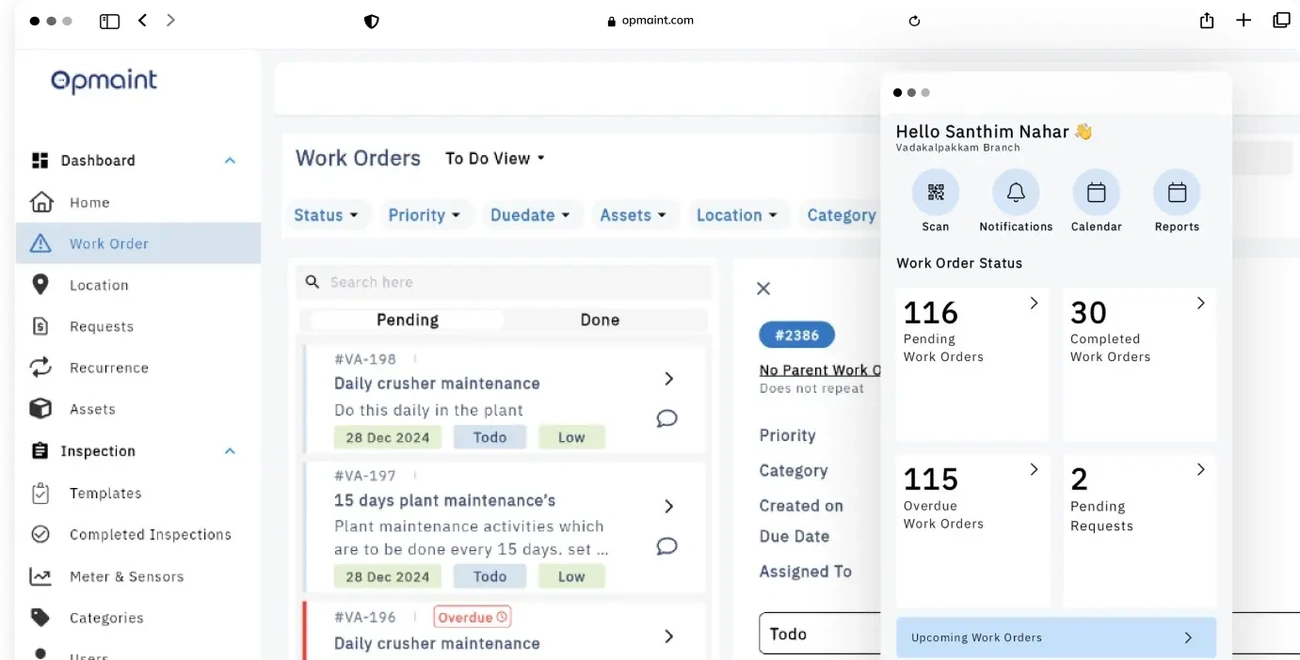
Many organizations face technical challenges when they add advanced dashboard features. opmaint eliminates these challenges with its unified work order management dashboard platform. The system brings together all nine key features under one roof.
Your company can be up and running in days, not weeks or months. This quick setup is possible because opmaint uses pre-configured templates. The platform's accessible drag-and-drop interface doesn't need much technical knowledge.
opmaint stands out by striking the right balance between standard features and customization. The work order management system comes ready to use with industry-specific settings. Your team can still adjust workflows to match your company's unique processes. You'll get immediate results while keeping your operational priorities intact.
The platform shines when it comes to training new users. Its accessible interface makes it easy to learn and speeds up adoption throughout your organization. Maintenance teams consistently give opmaint high marks because of its user-friendly design.
Technical support is a vital part of any work order tracking software. opmaint provides round-the-clock help and optimization services. These services help your dashboard grow with your business needs. This approach turns your work order maintenance software into a valuable asset that adapts as your organization grows.
You need to think about the right mix of features for your work order management dashboard based on your organization's needs.
Organizations that implement complete dashboards like opmaint see better operational efficiency across many metrics. Teams that focus on individual features often miss chances to improve their processes. The best results come from matching current needs with long-term operational goals. A flexible platform enables your maintenance team to adapt as requirements change and strengthens your maintenance capabilities for future challenges. Book a Demo
Modern work order management dashboards are transforming maintenance operations from reactive to proactive, with the right features delivering measurable productivity gains and cost savings.
• Automation eliminates 40% of repetitive tasks - Automated work order creation and intelligent scheduling reduce manual oversight while improving task completion rates and equipment reliability.
• Real-time visibility drives 29% productivity gains - Mobile-friendly dashboards with GPS tracking and visual scheduling enable field teams to work more efficiently with instant access to critical information.
• Integrated systems reduce errors by 79% - Connecting work order management with ERP, IoT, and inventory systems eliminates data silos and creates a unified operational ecosystem.
• Customizable workflows improve compliance - Tailored approval processes, digital documentation, and automated alerts ensure regulatory requirements are met while adapting to unique business needs.
• Data-driven analytics optimize maintenance strategy - Advanced reporting capabilities help organizations shift from 20% planned maintenance to the industry-leading 80% planned maintenance ratio.
The most successful implementations balance immediate operational needs with long-term scalability, choosing platforms like OpMaint that integrate all essential features while maintaining flexibility for future growth.
Got a question? We’ve got answers. If you have any other questions, please contact us via our support center.
.webp)

.jpeg)
