
Work order software keeps maintenance operations running smoothly—it's how businesses prevent small issues from becoming costly problems. Equipment failures and facility issues happen, but a structured work order ensures your maintenance team has everything needed to restore operations quickly and safely.
A work order is a formal document that spells out exactly what maintenance work needs to happen. These documents go beyond basic task lists—they include troubleshooting steps, space for detailed technician notes, and all the specifics your team needs to complete jobs correctly. The process starts when someone spots a maintenance issue that requires professional attention. Track these completions over time, and you'll spot bottlenecks before they slow down your operations or identify technicians who need additional support.
This guide walks you through work orders from start to finish. You'll discover the different types your business might need, what makes an effective work order, and how various industries put them to work.
A work order creates a formal bridge between identifying maintenance needs and getting them resolved. These documents do more than track tasks—they establish clear communication channels between the people who spot problems and the teams who fix them.
Work orders provide all the essential information your maintenance team needs to complete jobs successfully. Each document includes task descriptions, assigned personnel, required resources, specific locations, and scheduling details. This structured approach helps businesses maintain equipment uptime while keeping operations running efficiently.
The real value goes beyond simple task management. Work orders create accountability by establishing a clear path from problem identification through completion. They also build a historical record that supports smarter planning, more accurate budgeting, and better decision-making over time.
Work orders serve different stakeholders across your organization:
Facility managers, maintenance teams, inventory managers, and asset managers use these documents to coordinate daily operations. About 53% of facilities now use computerized systems for maintenance management, making work order processing faster and more reliable.
Work orders appear across equipment-heavy industries. Manufacturing facilities use them to kickstart production processes. Utilities, telecommunications, facilities management, HVAC, and property maintenance companies depend on them for efficient task tracking and real-time coordination.
You'll find work orders handling maintenance requests at universities, documenting contractor jobs, and managing service calls in field operations. They support preventive maintenance schedules, emergency repairs, inspection protocols, and regulatory compliance requirements—making them essential tools for virtually any business that maintains physical assets.
Well-structured work orders include specific elements that ensure maintenance tasks get completed correctly. Each component serves a purpose in driving efficiency and accountability across your maintenance operations.
Every work order starts with a clear description of what needs to happen. Include specific instructions, step-by-step procedures, and define the exact scope of work. Your task description should explain both what technicians need to do and why the work matters—this prevents scope creep and reduces confusion. Add diagrams, safety protocols, and troubleshooting guides so technicians have complete information before they start.
Specify exactly who handles each task, whether that's an individual technician, a team, or an external contractor. Smart work order management software lets you assign jobs based on skills, certifications, and current availability. Advanced systems automatically match technician expertise with job requirements, considering factors like location and specialized knowledge.
List every required tool, part, and material needed to complete the work. This prevents costly delays from multiple trips to gather forgotten items. Build safety requirements directly into each work order, including hazard warnings, PPE specifications, and compliance requirements.
Set clear timing expectations with standard priority categories:
Get Demo of systems that include maintenance checklists technicians must complete before marking work finished. These checklists verify all steps were followed and create essential documentation. Include inspection points, quality checks, and measurement validations to build historical records for compliance and future planning.
Different maintenance situations call for different work order types. Each category serves specific operational needs and helps teams prioritize tasks based on urgency and impact.
Corrective maintenance work orders respond to equipment that's already failed or malfunctioning. These reactive requests get triggered when inspections uncover problems or when assets break down unexpectedly. The focus stays on repairs and component replacements that restore normal operations.
Preventive maintenance work orders follow planned schedules based on time intervals or usage hours. This proactive approach extends equipment life and cuts down on surprise breakdowns. McKinsey research shows companies that digitize preventive maintenance see 20% to 30% reduction in maintenance costs through regular checks, lubrications, and part replacements.
Emergency work orders handle urgent situations where safety risks or critical operations are at stake. Gas leaks, electrical faults, and production-critical failures demand immediate response. Emergency repairs typically cost more than twice what preventive maintenance programs require.
Inspection work orders authorize regular assessments to check asset condition and performance. These include quality control checks, compliance audits, and equipment evaluations that catch potential problems early. Many work order systems require technicians to answer specific questions before marking inspections complete.
Safety work orders get priority treatment since they address hazards that threaten people or property. Electrical work orders handle power system tasks and typically require technicians with specialized certifications.
General work orders cover maintenance tasks that don't fit other categories. Equipment installations, relocations, and operational support still need formal documentation and tracking through your work order system.
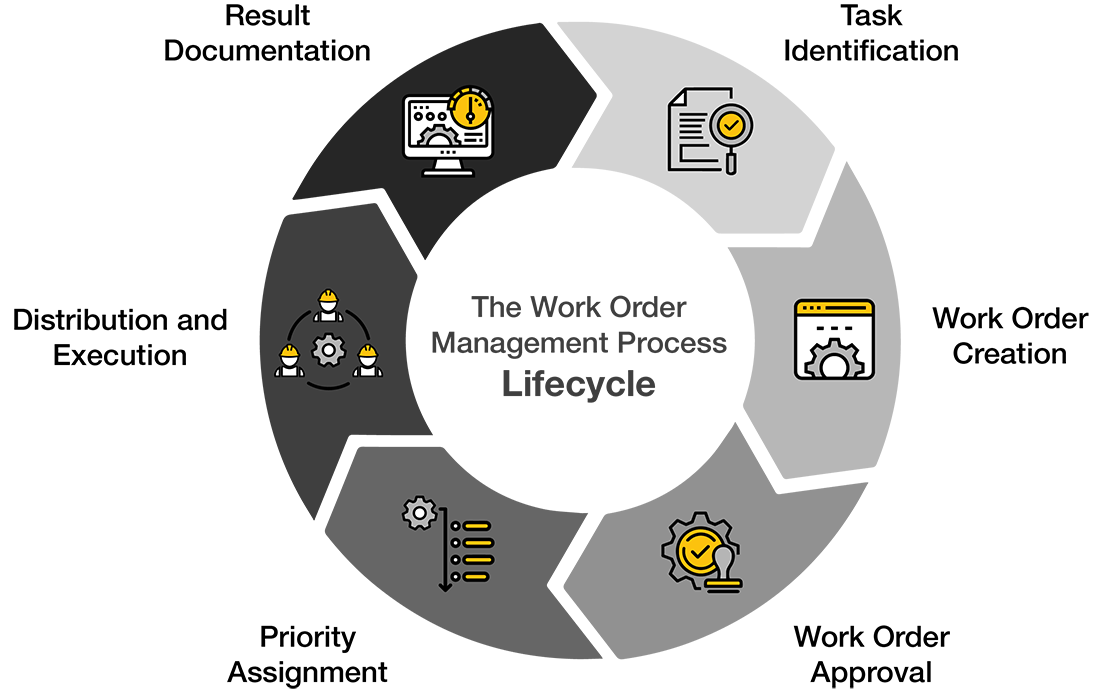
Work orders follow five distinct stages from problem discovery to job completion. Smart work order software connects these stages seamlessly, so maintenance requests never get lost or forgotten.
Maintenance needs surface through routine inspections, automated alerts, or employee reports. These fall into two main buckets: planned maintenance that follows a schedule, or unplanned work that pops up when equipment fails unexpectedly.
Someone spots a problem and fills out the details—location, equipment involved, what's wrong, and how urgent it is. Get these details right upfront, and you'll save hours of back-and-forth questions later.
Your maintenance team checks if the request makes sense and whether you have the resources to handle it. Some organizations require manager approval for expensive jobs—work orders over $10,000 often need director sign-off. Once approved, the request becomes an official work order.
Here's where the right person gets matched with the right job. Get Demo of systems that automatically pair technician skills with job requirements while factoring in location and availability.
Technicians document their work as they go—time spent, parts used, and any issues they encountered. Supervisors review completed work before officially closing the order. This creates a paper trail that helps with future planning and shows where your maintenance processes can improve.
Work orders turn maintenance chaos into organized operations that protect your business assets. These documents create clear accountability from the moment someone spots an issue until a technician marks the job complete.
The right work order system delivers measurable results. Organizations using computerized maintenance management systems see significant reductions in downtime and better resource allocation. Proper work order protocols directly impact your bottom line through longer equipment lifespans and fewer emergency repairs.
Different work order types help you prioritize what matters most. Emergency maintenance gets immediate attention while routine preventive tasks keep operations running smoothly. The five-stage lifecycle eliminates guesswork and creates consistency regardless of who handles the work.
Work order software automates the heavy lifting—matching technicians to jobs, tracking progress, and building historical data for smarter decisions. Whether you manage a small facility or oversee complex industrial operations, effective work order practices streamline maintenance activities and reduce costs.
Work orders might look like simple paperwork, but they form the backbone of successful maintenance operations that keep your business running day after day.
Work orders are far more than simple task lists—they're structured documents that transform maintenance chaos into organized, accountable operations that drive business efficiency.
• Work orders are formal documents detailing maintenance tasks with clear instructions, assigned personnel, required resources, and completion deadlines for equipment and facilities.
• The five-stage lifecycle (identification, submission, review/approval, assignment/scheduling, completion/tracking) ensures systematic maintenance management and prevents missed critical steps.
• Different work order types—corrective, preventive, emergency, inspection, safety, and general—help prioritize tasks effectively based on urgency and operational impact.
• Essential components include detailed task descriptions, assigned personnel, required tools/materials, safety protocols, priority levels, and completion checklists for accountability.
• Organizations using computerized work order systems report 20-30% reduction in maintenance costs through better resource allocation, reduced downtime, and improved compliance tracking.
Implementing proper work order management creates valuable historical data for future planning while ensuring critical maintenance issues receive appropriate attention based on their operational impact.
Got a question? We’ve got answers. If you have any other questions, please contact us via our support center.
.webp)

.jpeg)
